The 9 Best Payroll Software for Small Businesses [2026]
For 64% of organizations, running payroll manually means losing at least 1% of their total payroll spend each month to tax calculations and compliance checks.
The best payroll software helps eliminate these risks while automating the entire process from wage calculation to tax filing. Quality platforms reduce payroll errors through built-in audits that catch issues before they reach employees or tax agencies. They also save time using automation and AI-powered features.
Our compilation pulls together the nine leading payroll solutions that support employees and HR team members. We also break down pricing structures to help you choose one that’s right for your budget.
Top payroll software of 2026
Here are the top payroll software solutions on the market, listed for comparison, and not ranked in any particular order.
|
Platform |
Best For | Key Features | Pricing |
|---|---|---|---|
|
Paylocity |
All-in-one HR, payroll, and expense management |
|
Custom |
| OnPay | Strong compliance tools |
|
Plans start at $49/mo. + $6/employee/mo. |
| QuickBooks Payroll | QuickBooks Accounting users |
|
Plans start at $88/mo. + $6.50/employee/mo. |
| Deel | Global workforce management |
|
Plans start at $29/employee/mo. |
| Patriot |
Year-end payroll tax filings |
|
Plans start at $17/mo. + $4/employee/mo. |
| SurePayroll | Small businesses and household employers |
|
Plans start at $29/mo. + $7/employee |
| Gusto | Benefits administration |
|
Plans start at $49/mo. + $6/employee/mo. |
|
ADP |
Multi-entity payroll support |
|
Custom |
| Rippling | Extensive integrations |
|
Custom |
1. Paylocity
?ts=1767111894106&$ProductTIleImage$&dpr=off)
Best for: All-in-one HR, payroll, and expense management
User sentiment: G2 reviewers consistently praise Paylocity's ease of use and its user-friendly interface, noting that it’s intuitive and its customer support is helpful.G2.com - Paylocity Reviews 2026: Details, Pricing, & Features
Paylocity unifies HR, Finance, and IT on a single platform, simplifying payroll tasks while maintaining accuracy. Payroll managers get a single system for visibility into labor costs without juggling separate tools or reconciling disconnected data.
The platform proves ideal for companies seeking efficient payroll processing alongside comprehensive HR capabilities, especially as 87% of HR decision-makers value a unified approach to HCM. Since Paylocity handles complex scenarios, including multi-state payroll and integrated expense reimbursements, while scaling with your business, it eliminates the need for migration.
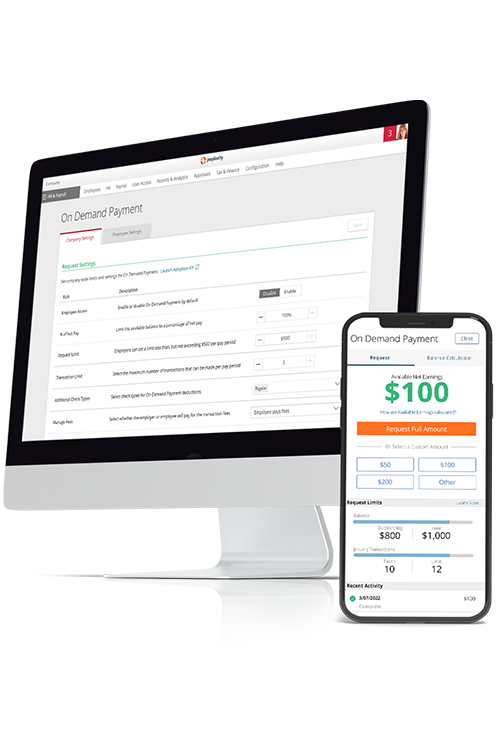
Employees access a self-service platform with mobile app integration, enabling them to view payroll information, including pay stubs and tax documents. They may also request on demand pay, providing enhanced financial flexibility.
Key features:
- End-to-end payroll processing with built-in validations, audits, and checks: The platform automatically runs pre-processing audits that flag variances and catch errors that typically slip through manual review, reducing the risk of costly corrections.
- Custom rules, dashboards, and reports: Custom dashboards provide a clear look at labor costs by department, location, or project, enabling better budget management.
- Automated tax filing and compliance management: Avoid payroll tax penalties with tax geolocation capabilities that automatically apply the correct tax rates for each employee, alongside automated payroll audits and a centralized compliance dashboard.
- Integrated and synced with HCM functionality: Time and attendance data flows directly into payroll calculations without manual entry, and data is also synced with employee benefits and finance data for easy reimbursements.
- Outsourcing options: If your business needs help managing payroll, Paylocity's Elevate Payroll is a managed payroll services program that handles critical payroll processes on your behalf, saving you time, improving accuracy, and reducing risk.
Pricing: Custom
?ts=1767882597017&$ProductTIleImage$&dpr=off)
2. OnPay

Best for: Strong compliance tools
User sentiment: G2 users rate OnPay's customer service and onboarding highly.G2.com – OnPay User Review (1) However, some users note limited time-tracking capabilities and integrations.G2.com – OnPay User Review (2)
OnPay positions itself as a compliance-first payroll management system with built-in reminders, multi-state support, and transparent pricing. The platform handles federal, state, and local tax filing backed by an error-free guarantee, making it a fit for companies that operate across state lines or face complex compliance requirements. OnPay is ideal for businesses that want comprehensive features without tiered pricing.
The service includes unlimited payroll runs, multiple pay schedules, and benefits administration support from licensed brokers in all 50 states.OnPay.com - Discover OnPay’s Top Payroll Software Features OnPay offers dedicated onboarding support and phone assistance during extended hours.
Key features:
- Multi-state payroll support: Process payroll for employees in all 50 states without additional costs while handling jurisdiction-specific tax calculations, withholdings, and compliance requirements automatically.
- Built-in compliance reminders: Custom personnel checklists track documents with expiration dates and the system alerts administrators when employees are out of compliance.
- Transparent flat pricing: One subscription tier includes all features, with no hidden fees or required upgrades.
Pricing: Plans start at $49/month + $6/employee/monthOnPay.com - OnPay Pricing Starts at $55 Per Month
3. QuickBooks Payroll

Best for: QuickBooks accounting users
User sentiment: On G2, users report satisfaction with QuickBooks's ease of use and its integration with other QuickBooks products. Other users note that it can be more expensive than alternatives, and customer service sometimes falls short.G2.com - QuickBooks Workforce
QuickBooks Payroll integrates directly with QuickBooks Online, making it a useful payroll software for accounting professionals. The software automatically syncs employee wages, tax payments, and expense data into your general ledger, eliminating duplicate entries and reconciliation work. QuickBooks works well for companies that prioritize accounting integration over standalone payroll capabilities.
The platform handles automated tax calculations, same-day direct deposit, and workers' compensation administration. And with the Elite Tier, QuickBooks even offers even offer tax penalty protection up to $25,000.QuickBooks – Tax Penalty Protection
Key features:
- QuickBooks accounting sync: Run payroll and accounting in the same QuickBooks ecosystem, with payroll transactions and payroll tax information automatically synced into QuickBooks Online.
- Same-day direct deposit: Submit payroll as late as the morning of payday, and employees receive funds the same day.
- Automatic tax payments: QuickBooks calculates, files, and pays your federal and state payroll taxes for you, with automated local tax filings available in select plans.
Pricing: Plans start at $88/month + $7/employee/monthQuickbooks.intuit.com - QuickBooks Payroll
4. Deel

Best for: Global workforce management
User sentiment: Deel Payroll users appreciate its fast payments and convenience. Still, others note its customer support relies on AI and receiving help is difficult.G2.com - Deel Payroll
Deel specializes in international payroll and contractor management, providing HR and payroll software that handles compliance, contracts, and payments in over 150 countries.Deel.com - Payroll It functions as an employer of record (EOR) in countries where you lack a legal entity, handling local contracts and compliance while you maintain operational control.
Deel processes payments in multiple currencies, manages visa and work permit requirements, and helps you stay in compliance with local labor laws. The platform also provides automatic HRIS sync, creating a single source of truth for employee records.
Key features:
- Global payroll and compliance: Process payroll for employees and contractors in 150+ countries with automated tax calculations, local labor law compliance, and multi-currency payments.
- EOR services: Hire full-time employees in countries where you don't have a legal entity, allowing Deel to become the legal employer while you manage day-to-day work assignments and performance.
- Contractor management: Create compliant independent contractor agreements with invoice tracking, milestone-based payments, and classification guidance to maintain proper contractor relationships by avoiding misclassification penalties.
Pricing: Plans start at $29/employee/monthDeel.com - Pricing
5. Patriot

Best for: Year-end payroll tax filings
User sentiment: Some reviewers note issues with payment delays and slower direct deposit processing.G2.com – Patriot Software User Review (2) However, satisfaction with its ease of use and customer support is high.G2.com - Patriot Software Reviews 2026: Details, Pricing, & Features
Patriot delivers affordable payroll management software designed specifically for small businesses with straightforward payroll needs. The platform assists with year-end tax filings by automating W-2 and 1099 generation, submitting them to federal agencies, and distributing them at the state level at no additional cost.
The software features a simplified, three-step payroll process, offers free direct deposit, and integrates with its own accounting software or QuickBooks. Beyond the Basic Payroll tier, Patriot also offers a Full Service Payroll plan where Patriot handles all tax filings on your behalf.
Key features:
- DIY or full-service tax filings: Choose between Basic Payroll, where you handle tax filings yourself, or Full Service Payroll, where Patriot calculates, deposits, and files all payroll taxes on your behalf.
- 1099 contractor payments: Process W-2 employees and 1099 contractors in the same Patriot payroll run and create 1099-NEC and 1099-MISC forms from year-end data before e-filing them directly from the platform.
- Free payroll setup assistance: Receive complimentary setup help from USA-based support representatives through a setup checklist and ongoing phone, email, or chat support.
Pricing: Plans start at $17/month + $4/employee/monthPatriotsoftware.com - Patriot Software Pricing
6. SurePayroll

Best for: Small businesses and household employers
User sentiment: Users on G2 praise SurePayroll's payroll ease and management, along with its simplicity. Other reviewers state that essential add-ons and multi-state roll options require additional fees.15
SurePayroll, a Paychex company, is a niche payroll solution for small business owners with limited payroll expertise, solo entrepreneurs, and household employers who need payroll for nannies or caregivers. The platform emphasizes speed and simplicity, positioning itself as a way to run payroll in minutes from any device.
The platform's Full Service plan handles automatic filing and deposit of payroll taxes. A cheaper No Tax Filing tier is available for businesses that want to handle filing themselves. Multi-state support is also available for a flat add-on fee rather than built into the base price.
Key features:
- Unlimited pay runs: Run payroll as many times as needed each month at no extra charge, with setup aimed at owners with limited payroll expertise.
- Automatic calculation, filing, and deposit of payroll taxes: Federal, state, and local payroll taxes are calculated, filed, and deposited automatically on the Full Service plan, with free two-day direct deposit and 24/7 online access to pay history.
- Add-on services: 401(k) plans, workers' compensation, health insurance, and payment processing are available as add-ons, alongside a dedicated nanny/household employer plan.
Pricing: Plans start at $29/month + $7/employeeSurePayroll.com - Small Business Payroll Pricing
7. Gusto

Best for: Benefits administration
User sentiment: Gusto's intuitive interface and easy setup earn positive reviews from users. However, some reviewers note limited customization for complex payroll scenarios compared to Gusto alternatives.G2.com - Gusto
Gusto offers solid payroll software for small businesses that need the essentials without the enterprise-level complexity. It aims to provide user-friendly software for small businesses in need of payroll solutions, with a minimal learning curve and transparent pricing.
The platform offers various integration capabilities, connecting to popular accounting tools such as QuickBooks, Xero, and FreshBooks, making it suitable for businesses already relying on these systems.
Key features:
- Automated tax filings: While staying up to date with current tax law, Gusto calculates payroll taxes, then files forms like W-2s, 1099s, and I-9s automatically with the appropriate agencies.
- Unlimited payroll runs: Run payroll as many times as needed each month, including off-cycle runs for bonuses or terminations.
- Benefits and onboarding tools: Integrate health insurance, 401(k) retirement plans, FSAs, HSAs, and commuter benefits directly into payroll.
Pricing: Plans start at $49/month + $6/employee/monthGusto.com - Gusto Pricing, Plans & Fees (2026)
8. ADP

Best for: Multi-entity payroll support
User sentiment: Users say the platform is easy to use,G2.com – ADP Payroll Services User Review (1) but reviews for customer support is mixed. Some users report a lack of urgency from the support team,G2.com – ADP Payroll Services User Review (3) however others praise service reps for their responsiveness.G2.com - ADP Payroll Services User Review (4)
ADP brings a long record of expertise to companies that need scalable payroll processing software across multiple locations. Similar to Paylocity, the platform offers several tiers for businesses of all sizes, from small organizations to large enterprises. ADP especially suits businesses that require dedicated support and the ability to scale as headcount grows.
The vendor handles automated payroll processing, full federal, state, and local tax filing, and integrations with time-tracking and benefits platforms. ADP manages complex scenarios, including wage garnishments and multi-state taxation, and integrates with earned wage access programs.
Key features:
- Native global payroll: ADP manages international payroll through its own proprietary infrastructure in over 140 countries, providing direct local expertise and compliance support.ADP.com - ADP Global Payroll®
- ADP DataCloud: The DataCloud add-on lets you benchmark data, including salary and compensation, against anonymized insights from thousands of employers and millions of employees to align pay with industry standard expectations.
- Integrated health and benefits brokerage: ADP serves as a licensed insurance broker, enabling businesses to purchase and manage health benefits directly within the ADP ecosystem.
Pricing: CustomADP.com - Payroll Price and Plan Comparison
Learn More: 9 Top ADP Alternatives
9. Rippling
?ts=1780349214546&$ProductTIleImage$&dpr=off)
Best for: Extensive integrations
User sentiment: On G2, reviewers praise Rippling's centralized HR features and its easy-to-use interface. However, when compared to other solutions and Rippling competitors, some users specifically point to challenges with the platform’s reporting and analytics tools, as well as slow loading times for basic functions.G2.com - Rippling Pros and Cons
Rippling is a human capital management platform providing comprehensive HR and payroll services. Its modular structure lets you add only the functions you need, which helps you avoid overpaying for features you don’t use.
The platform’s payroll suite syncs with the broader HCM platform, automatically calculates and files taxes, and lets you track changes across payroll runs. Rippling also offers integrations with over 600 apps, including accounting solutions, ERPs, and planning tools.Rippling.com - Push Your Apps to Perform at Their Best
Key features:
- Customizable reports and dashboards: Rippling provides automated reporting and customizable dashboards for various aspects of employee data.
- Integrated benefits platform: The platform connects benefits enrollment directly to payroll, automatically updating deductions when employees make benefits changes.
- Integrations with accounting software: Rippling integrates with accounting solutions, including NetSuite, QuickBooks, Sage Intacct, Xero, and more, to easily sync your payroll data.
Pricing: CustomRippling.com - Pricing
Features to look for when choosing the best payroll software
With the right payroll software features, the best solutions should improve accuracy and cut manual work across HR and finance. Use the features below as a checklist when comparing vendors and running demos.
- Configurable pay rules and accruals: Pre-processing dashboards and multi-step approval flows can minimize errors.
- Comprehensive review and submission flows: Multi-step, automated workflows create checkpoints, and review tools include side-by-side comparisons that highlight unusual changes.
- Payroll readiness and audits: Readiness checks flag missing tax IDs, inactive bank accounts, or terminated employees, while built-in pre-submit audits also surface anomalies.
- Tax compliance and geolocation: Built-in tax tables automatically update as rates change, and quality payroll processing software tracks where each employee lives, works, and travels.
- Pricing and total cost: Pricing for payroll system software typically combines a base platform fee with per-employee charges and should include implementation, data migration, support tiers, and paid add-ons.
- Automated payroll runs: Payroll automation features sync data and run accurate payroll with minimal manual data entry.
- Employee self-service portals: Employee self-service portals let people access and manage their own information.
- Integrations: Payroll software solutions should integrate with the apps you already use, especially accounting platforms, so that you can sync your data smoothly.
Improve payroll and expense workflows with Paylocity
Choosing the best payroll software comes down to finding a platform that automates repetitive work and connects payroll data with the rest of your workforce management. For small businesses, these solutions work best when they grow with you instead of forcing payroll platform switches as headcount increases.
Paylocity delivers comprehensive payroll services for small businesses and enterprises alike. By connecting time tracking, benefits, payroll, and employee data in a single system, you eliminate disconnected tools and gain real-time visibility into labor costs.
Request a Paylocity demo today to get ahead of your company’s growth and explore features like automatic audits and simplified accounting integration.
Payroll software FAQs
Here are answers to common questions business owners and HR leaders ask when evaluating payroll management systems and comparing providers.
What’s the best payroll software for hourly and seasonal employees?
The best HR and payroll software solutions for hourly and seasonal workers sync cleanly with time tracking, support flexible schedules, and handle frequent hires and terminations without extra per-run fees.
Platforms like Paylocity and Gusto fit well because they pull time clock data directly into payroll calculations, automate overtime by rule, support multiple pay rates, and offer mobile time clocks with geolocation to reduce buddy punching.
How do you choose payroll software based on company size and budget?
To choose a payroll software based on company size and budget, audit your business size and consider:
- Small businesses (0-49 employees): Prioritize ease of use and transparent pricing while considering a platform's core payroll tools.
- Mid-size businesses (50-499 employees): Look for scalable platforms that layer on benefits, reporting, and multi-state compliance.
- Enterprises (500+ employees): Evaluate options supporting complex structures, global payroll, ERP integrations, and full cost transparency, including per-employee fees, implementation, add-ons, and support.
What's the best payroll software for small businesses?
The best payroll software for small businesses features an easy-to-use interface that combines HR, payroll, and expense management on a single platform. For many small businesses, Paylocity is the best payroll solution that eliminates disconnection and joins payroll data together.
What should small businesses look for in payroll software?
Small businesses should prioritize:
- Transparent and predictable pricing.
- Automated tax filing.
- Compliance tools.
- A simple setup process.
Built-in audits and pre-processing checks also help catch errors before they reach employees or tax agencies, and self-service portals reduce the back-and-forth admin work that is usually done manually.
What payroll software is the easiest for small businesses to use?
Ease of use often comes down to setup time and interface simplicity. Platforms like PaylocityG2.com – Fall 2026 Payroll Grid Report – Paylocity and OnPayG2.com – Fall 2026 Payroll Grid Report – Onpay score well on G2 for usability, while other solutions like SurePayroll market themselves around getting a first payroll run done in minutes. Paylocity's edge for growing businesses lies in combining simplicity with the flexibility to add HCM functionality later, so switching platforms isn't necessary as the business scales.